Everything Is In One Place Now: Our New Homemade Website and System
Everything moved off PushPress and Squarespace onto something built for this club. Here is where it all lives, what carried over, and what it costs.
It’s been a long time since I’ve written anything here, and this year has a lot to do with that. Quick life update before the real post.
My mother is doing well on her treatments, which we’re very thankful for. Work is good at the regular 9 to 5, which yes, I do have, on top of running DFWYAS for free. And we have a baby on the way in late February or early March, because apparently we weren’t busy enough.
Which brings me to this. Over the last three weeks I’ve put more than four hundred hours into building a system made specifically for this club. It takes us off PushPress, off Squarespace, and off everything else except the services that host our servers and hold encrypted information. Here’s what it does, where everything lives, why we did it, and answers to as many questions as I could think of ahead of time.
Thank you to everyone who’s been patient while this came together.
1Why we left
A lot of people have been supportive of this change, and I appreciate it. A few have asked a fair question, which is why do it at all, and was it worth the time. I think it was, and since I try to be transparent about what the club makes and what it spends, here is the honest version.
Our old setup wasn’t expensive when we started, it got expensive as we grew. PushPress is gym software, and it had punch cards, memberships and a calendar, which on paper is most of what we need. But we aren’t a gym, and the fit was always something we were working around rather than working with.
The cost is the part that surprises people. They have a free plan that we used for a while until we grew out of it and needed more support. But then we grew out of their paid plan and also their support quality went down quite a bit. Last year it came to $5,238.60 just to be on the platform, and this year it would have landed around $8,000, because they take a platform charge on every transaction and we’re doing better than we were. Squarespace was another $756.40 for the website builder on top of that. For a club where every dollar is meant to go back into making things accessible, that’s a lot of money to spend on being allowed to take payments.
Moving away from all these 60 percent of the way there systems lowered our cost to about $180 a year.
- PushPress$5,238.60
- Squarespace$756.40
- Cloudflare, Resend, and a few small pieces
What made it harder was support. They moved toward AI for most of it. It probably made sense for them. It didn’t work for us. One time I worked past the support bot, reached what I thought was a person, and found out that was also a bot. When I finally got a human it took one to two weeks to look into why a member had been double charged, and we never did find out why. Their event system, which we depended on, had caching problems that would show people the wrong thing, and they acknowledged the issue but it never made an update while other things did.
I would like to think we were a power user who supported them a lot. We probably had more events, more users and more transactions going through than their normal client, but based on what others have said and what we felt, people who used their “Core” product never really felt supported. Their push was their “Grow” CRM offering that you could optionally pay on top of.
Squarespace was the same shape of problem. Their event system is built for a business posting one to four events a month and we post hundreds, with no recurring events, no automation in SEO, and everything done by hand every single time. They also had spacing issues that never went away, their prebuilt sections didn’t play well with mobile, and everything was so manual that it’s only intended for the most basic of websites. Posting a month of events used to be a one to two day job. Now it takes an hour or two, and I own the images, the storage, the editing and the data underneath all of it.
The whole thing now runs on Cloudflare D1, Domains, Media and R2, with Resend for email and a handful of small pieces around them, and it comes to roughly $180 a year. That difference isn’t profit, it’s what pays for the credit packs, more free events, and paying our instructors better.
I was lucky here. I happen to have the background to build back end systems, so what would have been an impossible cost for most clubs our size was mostly my evenings for three weeks, and I don’t take that for granted.
The part I’m most glad about isn’t about the money though, it’s about adding features that you all want to see. If someone tells me they want a calendar they can add to their phone, I can build it in an afternoon, where before that was a feature request that might get looked at in three to six months if at all.
2What happened to your credits, membership and bookings
We want DFWYAS to be as affordable and accessible as possible, and for people to have the opportunity to try everything we run, not just the one thing they already come to. Because of that we’ve overhauled our dance class packs into a universal credit system. They work on the whole calendar, whatever the activity is. Dance class, craft night, workshop, painting, TTRPG, murder mystery, it doesn’t matter, they all take credits and they all cost less that way.
If you had credits, they came over. The number will look bigger than you remember, because the new system counts in smaller units, so every credit you had became four and a standard class costs four. You can book exactly as many classes as you could before. They’re good until February 22, 2027.
If you have a membership, it’s active and your renewal date hasn’t changed. We couldn’t move your card, because card details can’t be transferred between payment systems, so please add it once when you sign in. Nothing will be charged before your normal renewal date.
If you were already signed up for something, every class and event you had booked came with you. You don’t need to book again and you won’t be asked to pay again. You can see everything you’re signed up for on your account page.
One thing we did on purpose. We didn’t migrate accounts that had no packs, no upcoming reservations and no membership. We had over four thousand inactive accounts and no easy way to clear them out, so we left them behind rather than carry them across. You don’t need an account to sign up for an event anyway, but it’s there if you want to keep track of what you’re going to, put a card on file, or use credits and memberships.
3Where everything is
The old site had one way in, which was the calendar, and everything else was a page you had to already know about. The new nav is built around the seven things people actually come here for.
Event Calendar is the whole club in one place, every category, week by week. If you only ever use one link, use this one.
Social Events, Dance Classes, Arts & Crafts, Tabletop RPGs & Board Games and Wellness & Fitness each open a menu of what runs under them, with the day and time printed next to the name. You can see that Board Game Night is the 3rd Friday at 7:30pm without clicking anything.
About holds the pages that aren’t events. Our story, the leadership, the instructors and hosts, pricing and memberships, the FAQ, the blog, and how to contact us.
The pages worth bookmarking
/all-events is the calendar. Filter it by category, switch between the week view and the list, and book from the card without leaving the page.
/dance-schedules-and-prices is the dance side laid out by day, so you can read a whole week down a column instead of scrolling through a list.
/pricing-and-memberships is every price we charge, in one place, with the club fee shown rather than added at the end.
/links is the short list we hand out in person and put in our Instagram bio, for when someone asks “where do I sign up?” and you have about four seconds to answer.
There are also a few pages that live off to the side because they only matter if you need them. Private lessons, weddings, the board game library, and Alexi’s instructor page are all one click deep from the menu they belong to.
4Your account
Almost everybody needs to make a new account. We only rebuilt the accounts that had something in them, meaning a credit pack or a membership. If that’s you, your name and your balance are already sitting there and all you have to do is set a password. If it isn’t you, there’s nothing to recover, and signing up takes about a minute.
Once you’re signed in, it’s the same two words wherever you are. On a computer, My Account is the button in the top right of the nav bar, next to Sign Out. On a phone it’s in the bar itself, and again at the bottom of the menu under About, so either one gets you there.
The account page has five tabs across the top. On a phone the names are shortened so they all fit, so Active Plans reads as Plans and Documents reads as Docs.
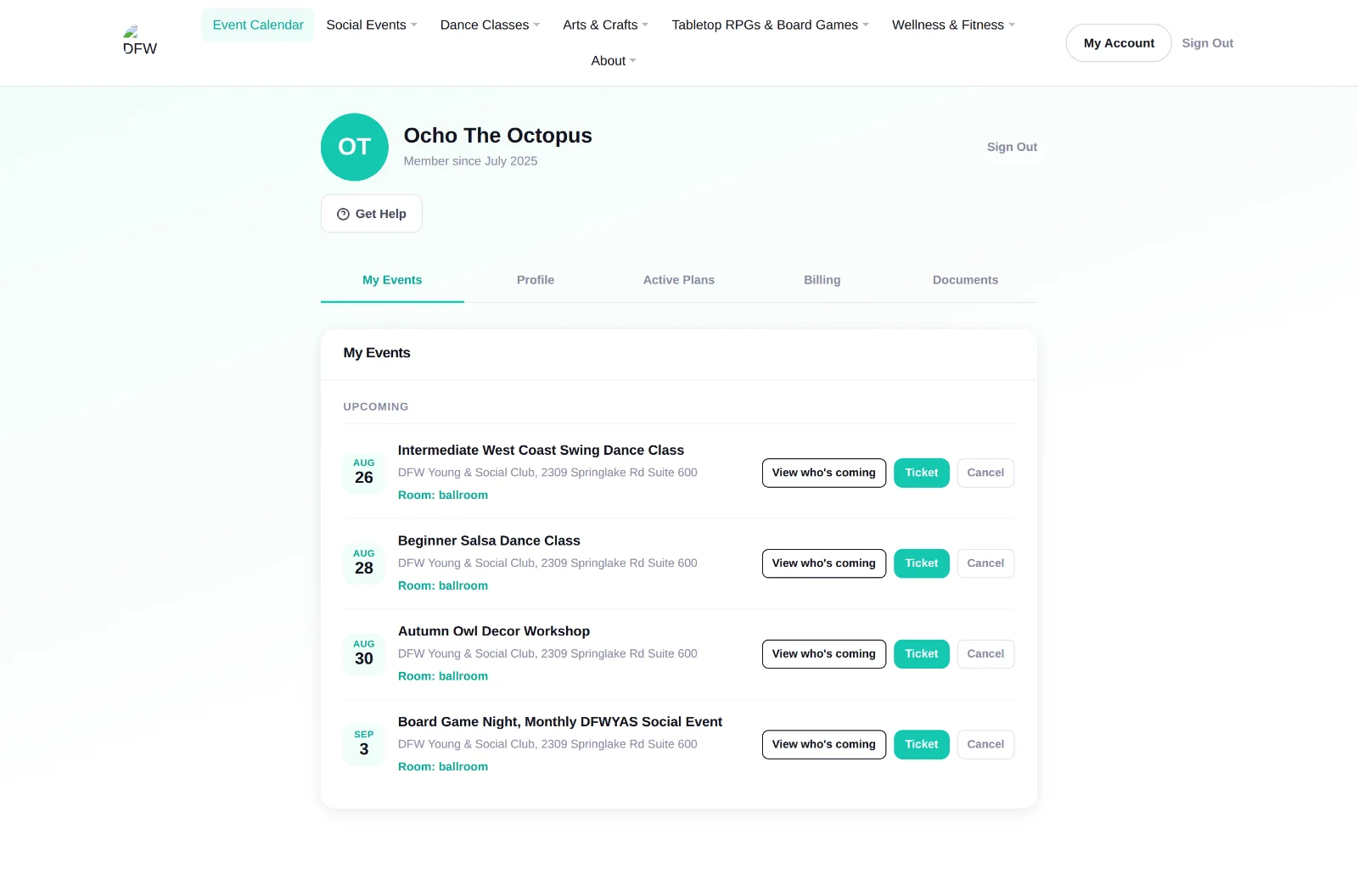
My Events
Everything you’re signed up for, soonest first, with the date, the time and the room. Cancel from here if your week changes. If you paid with credits the credits come back, and if you paid with money it goes back the way it came.
Every upcoming booking also has a Ticket button for the QR code at the door and a View who’s coming button, which shows who else is booked on that date. Both disappear once the event has passed.
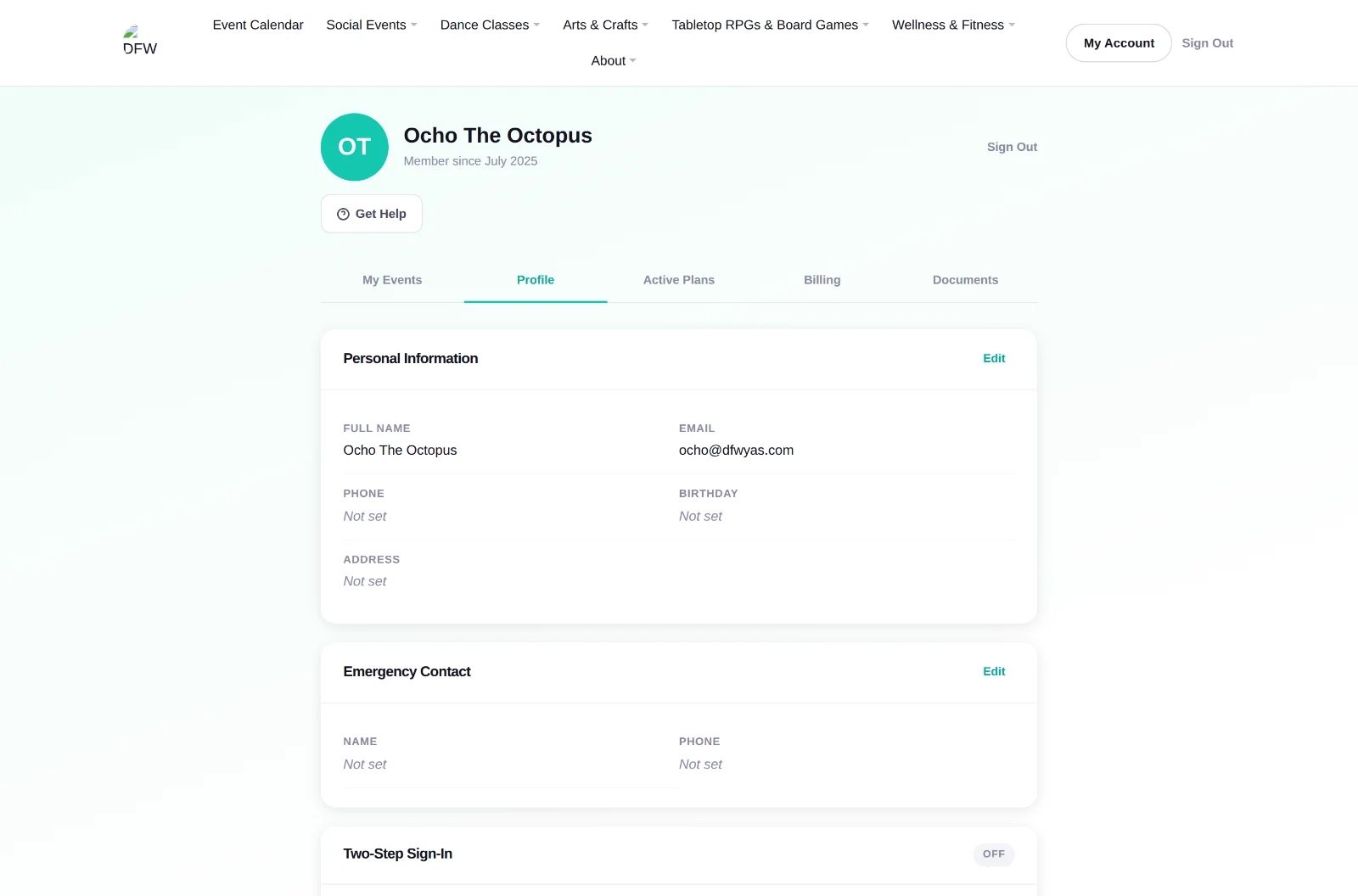
Profile
Your name, your photo, your email and your password. Tap the circle with your initials on it to upload a photo, which is what other people see next to your name in “Who’s coming.” Your email is how we send confirmations and reminders, so if it changes, change it here. Once you set a password it stays until you decide otherwise.
Turn on two-factor authentication
It’s optional and we recommend everyone use it, especially if you keep a card on file. You’ll set it up with Google Authenticator, Microsoft Authenticator or something similar.
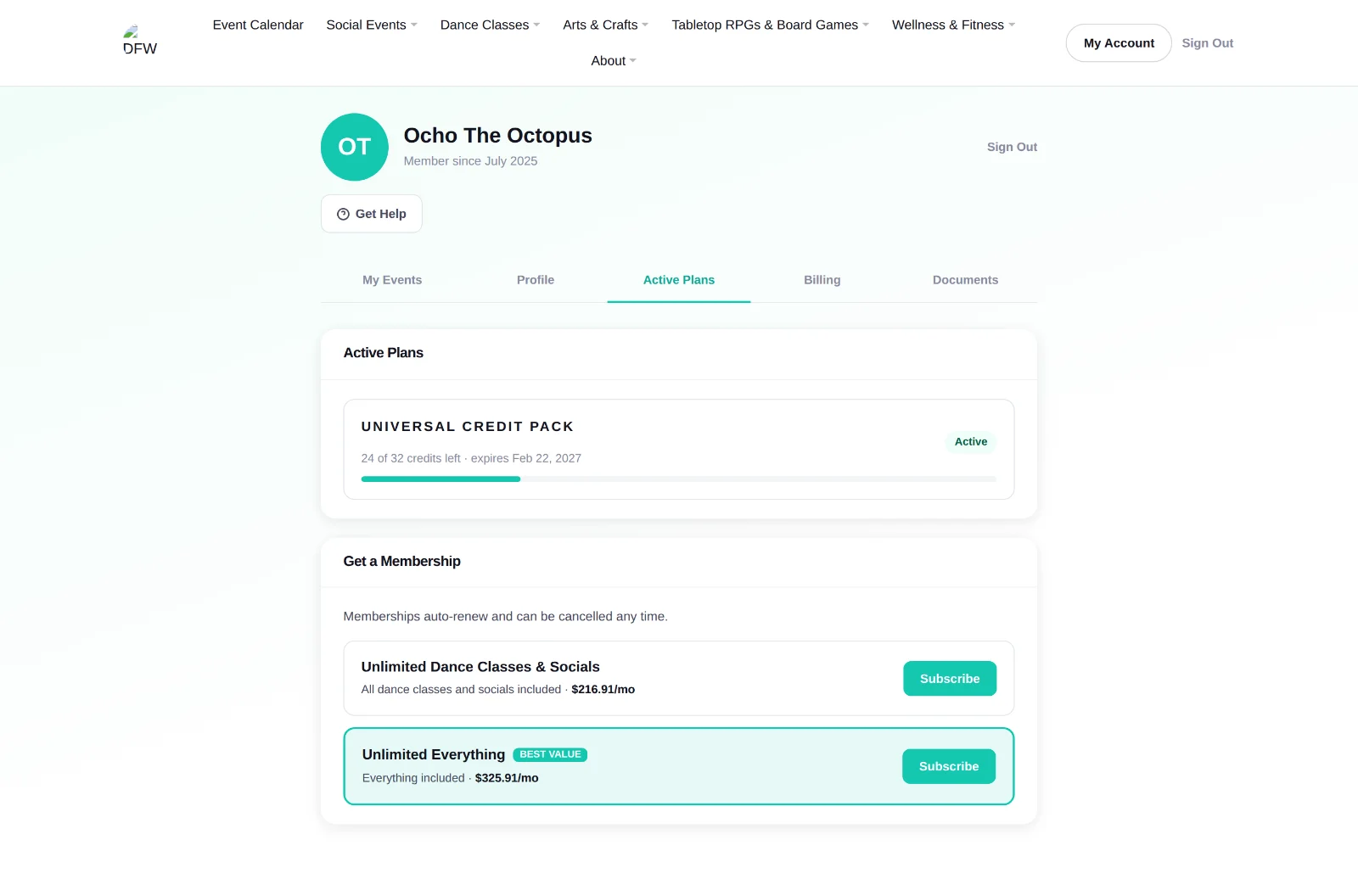
Active Plans
Your credit balance, when those credits expire, and your membership if you have one. Underneath is the history of every credit you’ve earned and spent, so if the number ever looks wrong you can see exactly what moved it.
Memberships are $199 or $299 a month plus the 9% club fee, and this is where you see which one you’re on and when it renews.
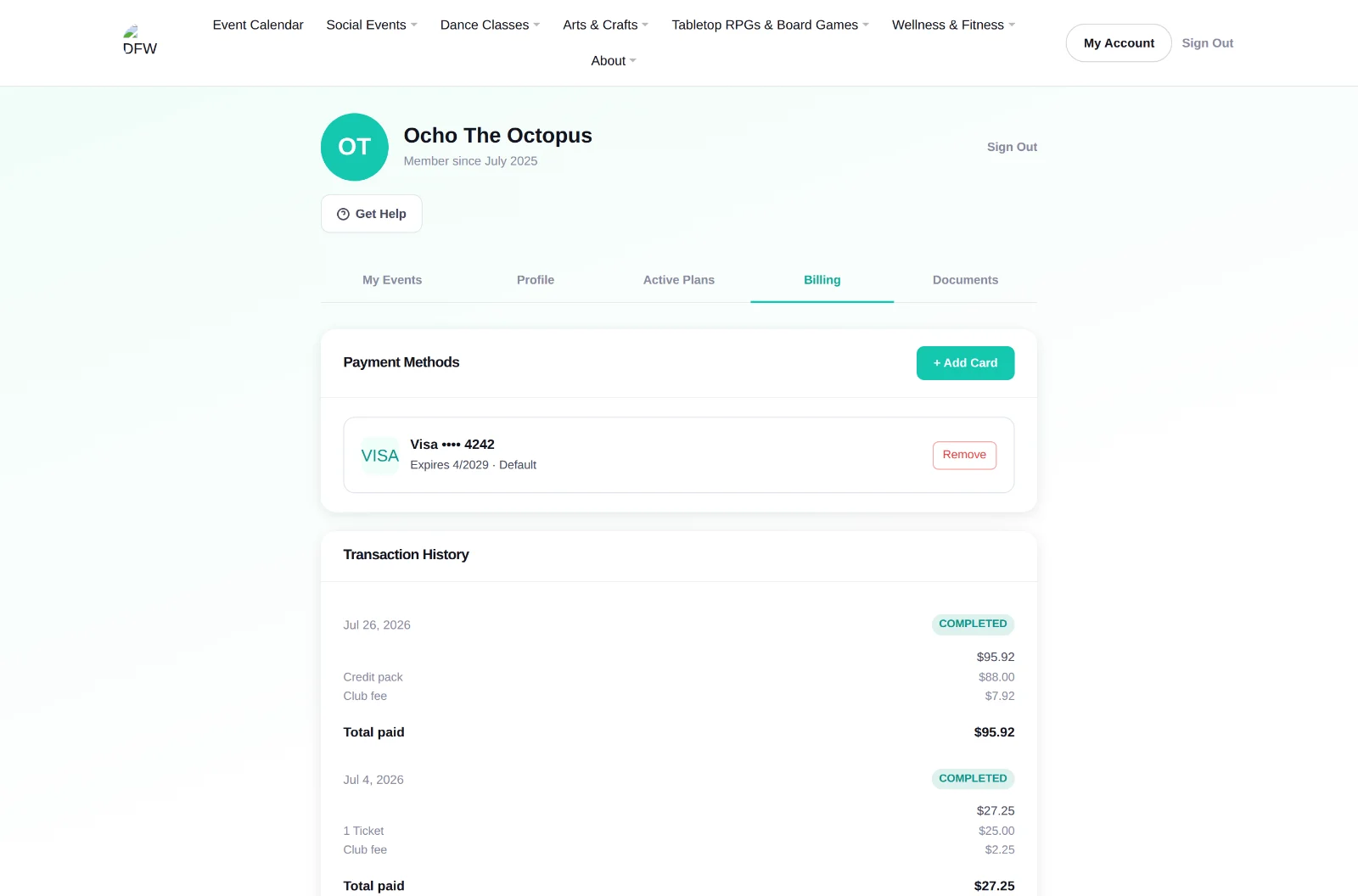
Billing
Every purchase you’ve made, with a payment summary of the transaction. You can add or remove a card here, and nothing is charged automatically to a saved card except a membership renewal, private lesson payments, and anything you tell us to “charge the card on file” for in person.
Documents
The waiver, the terms and the privacy policy, with the version you agreed to and the date you agreed to it. If we ever update one, it shows up here for you to read and accept.
5How paying works
There are three ways to pay for anything here, and they’re three routes to the same events rather than three tiers of membership. You can move between them whenever you like.
Book a class, pay for that class, done. You don’t need an account to do this. We ask for your name, your email so we have somewhere to send the ticket, and that you agree to the rules. There’s an optional tick if you want us to email you a link to set a password afterwards.
A pack of credits sits on your account and spends on anything we charge for, not just the thing you bought it for. A standard dance class costs 4 credits. Packs are good for 180 days from the day you buy them.
Since not all classes cost the same, you might end up with 1 or 2 left over. No worries. Any time you buy a new pack, whatever is left rolls into it and the expiration date extends. So if you had 3 credits after four months and you buy another 48, you now have 51 credits and they expire six months from the new purchase.
$199 or $299 a month plus the club fee, month to month on purpose. A year paid up front is a year you have to ask for back when life changes. Cancel whenever and it runs to the end of the month you already paid for. There’s no cancellation fee.
The 9% club fee
Every paid booking has a 9% club fee on top of the ticket.
That covers card processing, chargebacks, which cost us $15 each on top of refunding the money, and some of what it takes to keep the facility running. It also funds our charitable programs and the financial assistance we hand out case by case.
We show it as its own line instead of baking it into the ticket, because I would rather you see what the event costs and what the admin costs than wonder why a $25 workshop rings up at $27.25. It’s the one part of a booking that doesn’t come back. Donations have no fee at all, so give ten dollars and ten dollars arrives.
If your plans change
You can cancel a booking yourself from My Events. What comes back depends on how much notice we have, because a seat released five days out gets filled and a seat released that evening usually doesn’t. It also depends on whether you paid with money or with credits, so here is both.
| When you cancel | Base admission | Credits |
|---|---|---|
| Over 5 days | Refunded to your card, less the 9% club fee | Credits returned to account |
| 2 to 5 days | Account credit, less the 9% club fee | Credits returned to account |
| Within 48 hours | No refund | Pay $1.25 per credit to keep them, or surrender them |
| No show | No refund | Credits are surrendered |
Dance classes and workshops are the exception. Cancel one at any time, including inside 48 hours, and the credits are returned with no fee.
Credits aren’t refundable for cash once bought, and unused credits don’t come back after the 180 days, though a new pack rolls the old ones forward as described above. Private lessons are non-refundable once booked; they reschedule free with more than 48 hours’ notice, cost $25 to move inside 48 hours, and a no-show isn’t refunded.
If we are the ones cancelling, for weather or anything else on our side, you get the whole thing back including the fee, or credit if you would rather. That’s our problem, not yours.
6Your data and your privacy
The short version is that we’re a social club, not an advertising business, and the way we handle your information should reflect that.
We never see your card number. Payments run through Stripe. If you save a card, Stripe keeps it and we keep a reference, just the last four digits and the brand, so you can tell which card you’re looking at.
We don’t sell your information. It goes to the services that make the club run and nowhere else. That list is short. Stripe for payments, Cloudflare for the site, the database and our video, and Resend for email. Google is on it only if you put it there yourself, by signing in with Google or by tapping our address for directions. Neither happens unless you do it.
There’s no cookie banner, because there’s nothing to ask you. We keep four cookies and every one of them does a job you asked for: keeping you signed in, remembering a device you told us to trust for two-factor, Cloudflare telling real visitors from bots, and Stripe watching for card fraud on the pages that take a payment. None of them records what you looked at. There’s no Google Analytics, no Tag Manager, no advertising pixel and no social tracker anywhere on the site, and we don’t follow you around other ones. A banner exists so you can refuse the cookies a site doesn’t need, and refusing ours would just mean not being able to sign in or pay.
The guest list isn’t public. No page on the site shows who is registered for anything to a stranger, and there’s no way to browse the club’s members. What there is, once you’ve booked a spot yourself, is a View who’s coming button on that event in your account. It shows how many people are in so far, who is hosting, and each person’s first name with the initial of their last name, plus their profile photo if they have set one.
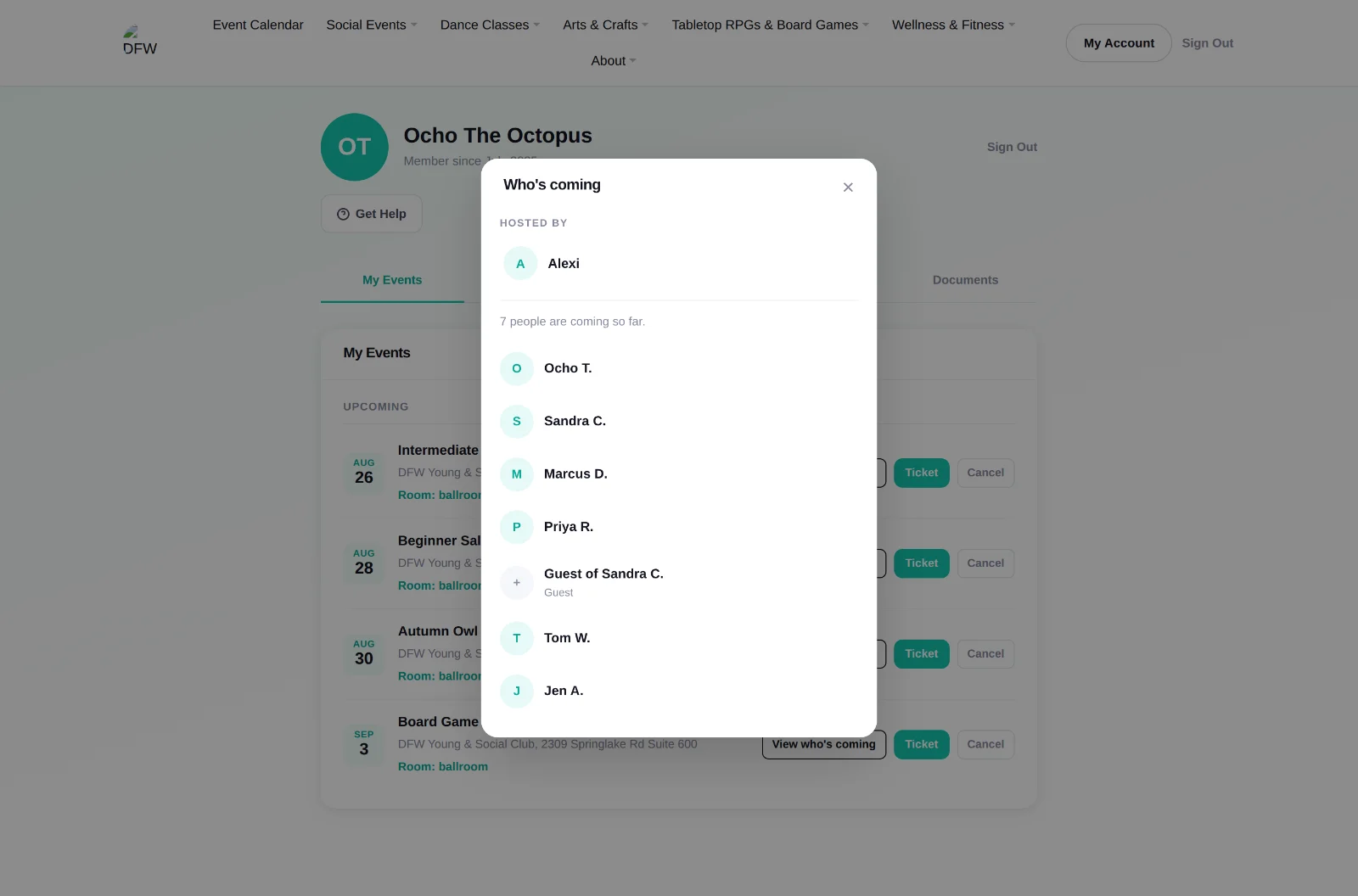
That’s the whole of it. No surnames, no email addresses, nothing that would let anybody build a mailing list out of a class roster. Guests count in the number, because a party of five is five people to anyone deciding whether to come, and an unnamed one shows as “Guest of Sandra C.” rather than as an invented person. Access is checked against your own booking every time, so it starts when you book and ends the moment you cancel. You stop seeing them, and they stop seeing you.
Most of what we ask for is optional. An account needs a name and an email. Phone number, date of birth, mailing address and emergency contact are all optional, all in Profile, and all yours to change or clear at any time. The emergency contact exists for one reason and we hope never to use it.
You control the optional email. Reminders, account notices and marketing are three separate switches in your account, and marketing is off unless you turn it on. Receipts, tickets, confirmations, cancellations and password resets aren’t optional, because each of those is a record of something that happened between us and you should have it. Every one of those switches is also reachable from the unsubscribe link at the bottom of any message, so you never have to sign in to stop hearing from us.
Waivers are recorded, not just ticked. When you accept the terms, the privacy policy or the participation waiver, we store which version you accepted and when. That’s what makes it an agreement rather than a checkbox, and it’s why Documents shows you a version number and a date next to each one.
You can ask us to delete your data. Email us and we will. The only thing that outlives an account is the record of agreements and transactions, because a waiver nobody can produce isn’t a waiver and a payment nobody can produce isn’t a payment. Ask and we’ll tell you exactly what we’re keeping and why.
The full policy is at /privacy-policy and it is written to be read, not to be survived.
Anything I missed?
If something here doesn’t match what you’re seeing, or there’s a feature you want, tell me. That’s the whole reason for building it this way.
Get in touch